Adding and removing staples
Updated 2026-09-13
Open the Grocery tab and tap the pantry button in the toolbar to open the Pantry staples screen.
Add a staple
Type an ingredient name in the search box. Matching ingredients appear under Add to pantry — tap the + next to one to make it a staple.
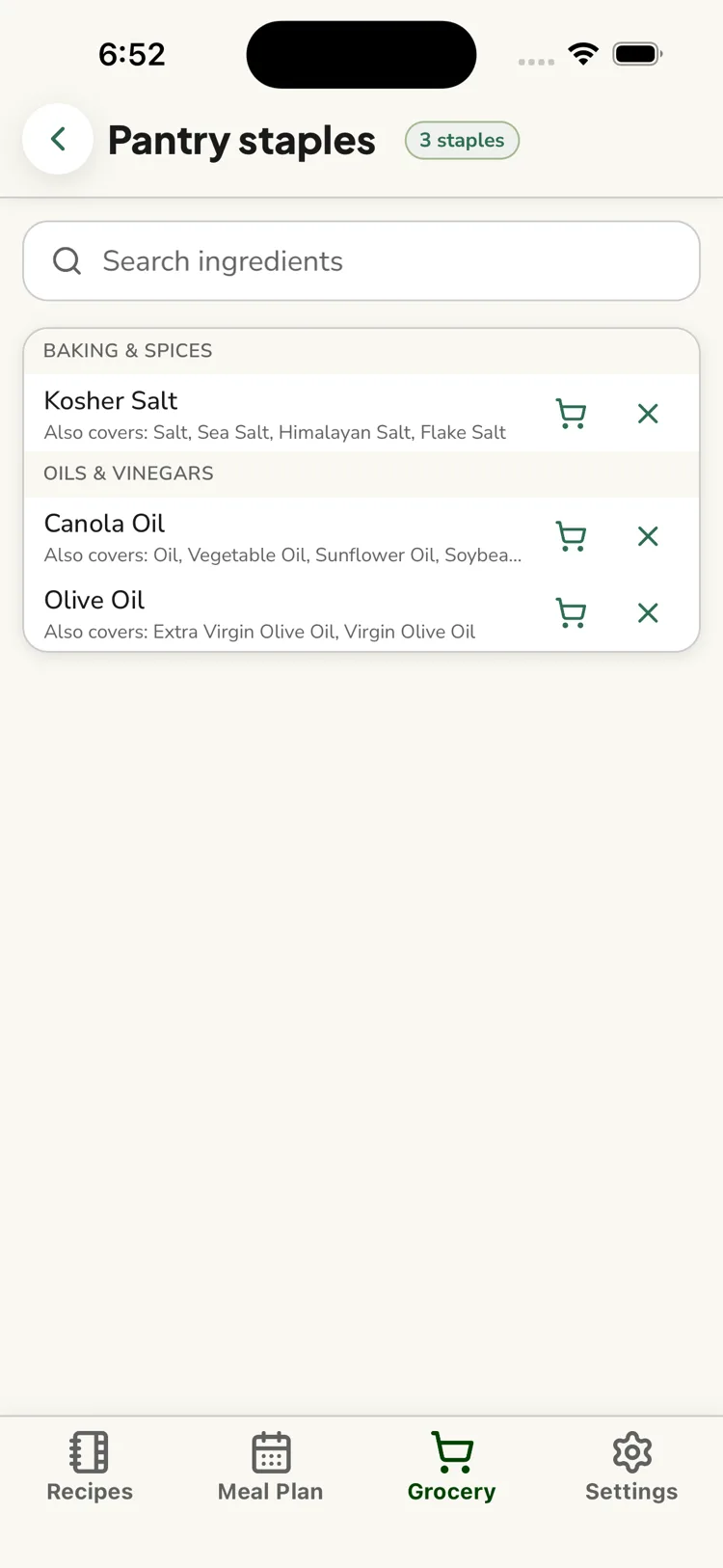
If a staple covers close variants (see How ReciLore matches ingredients), its row shows a small "Also covers: …" note listing them — for example flagging Salt shows "Also covers: Kosher Salt, Sea Salt, Himalayan Salt, Flake Salt".
Remove a staple
In the list of your current staples, tap the X next to an ingredient. It's no longer treated as something you always have.
"Ran out"
Next to each staple is a cart icon. Tap it to drop that ingredient onto your grocery buy list as a one-off, without removing it as a staple — for when you use the last of something and need to restock.
Staples are permanent until you remove them
Clearing your grocery list does not clear your pantry staples. They belong to the household for as long as you keep them.
Questions this answers
- How do I add a pantry staple?
- How do I remove a staple?
- What does "ran out" do?
- Do staples disappear when I clear the grocery list?
Still need help?
Email us at [email protected] and we'll get back to you.